Hi, this is CoinFirstStep. Open the order type box on Binance Spot and you'll see nine order types. This guide explains the Binance order types beyond Limit and Market, using the diagrams from Binance's own in-app help.
The short answer: Stop Limit and Stop Market wait for a price you set, then place an order. OCO places two orders at once, and when one is triggered, the other is cancelled. That's how you set a take-profit and a stop-loss together. Trailing Stop follows the price and sells (or buys) once the price turns by the percentage you choose. TWAP, Scaled Order and POV split one large order into many smaller ones.
20% commission rebate
Referral link: you get a 20% commission rebate on your trading fees (disclosure).
At a glance
| Where | Binance app: Trade → Spot → the order type box under Buy and Sell |
|---|---|
| Help inside the app | Tap the ⓘ in the order type box for Binance's help on each type |
| New to trading? | Start with Limit and Market: your first spot trade |
| Most useful next | OCO, to set a take-profit and a stop-loss with one order |
| Can skip for now | TWAP, Scaled Order and POV, which are built for large orders |
1. Where to find Binance order types
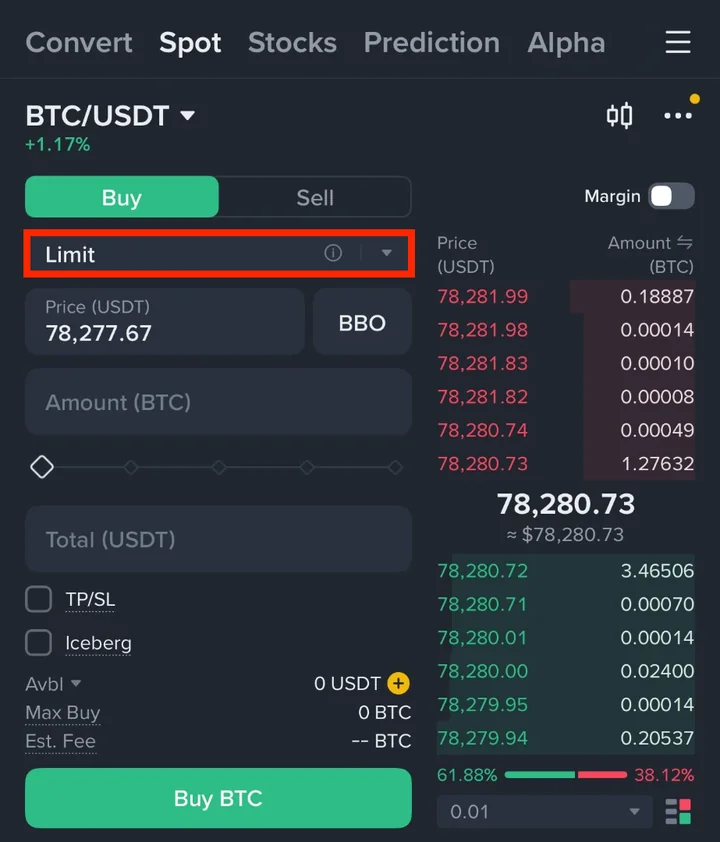
Open Trade → Spot in the Binance app and pick a pair, such as BTC/USDT. Tap the order type box under Buy and Sell. It shows the order type you're using now, such as Limit or Market.
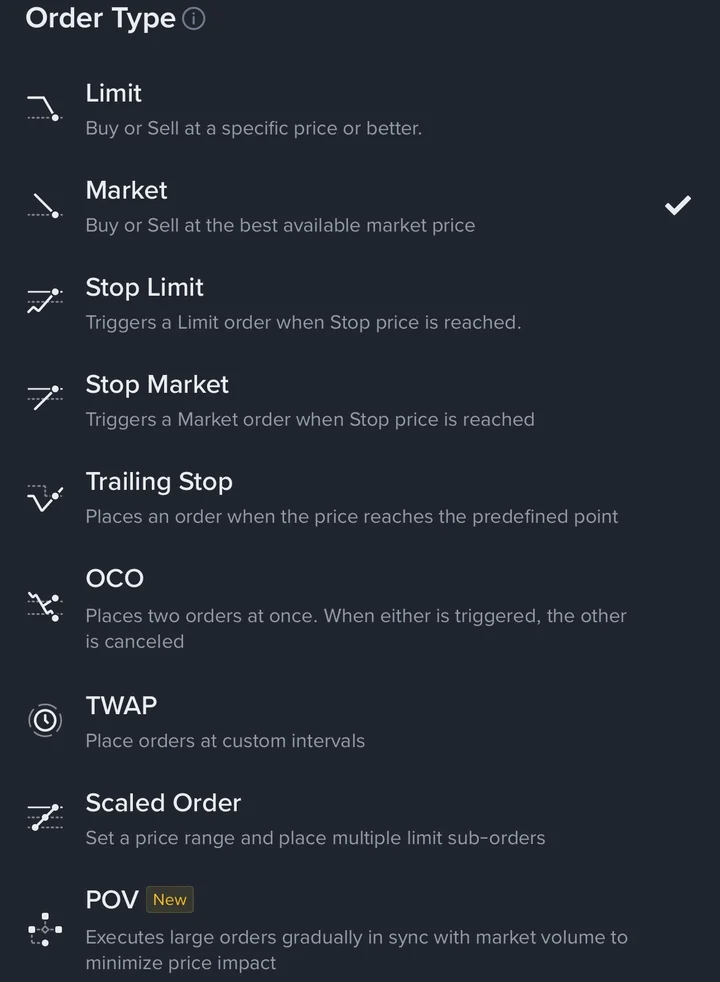
The Order Type list opens. Each type has a one-line description, and the tick marks the one you're using.
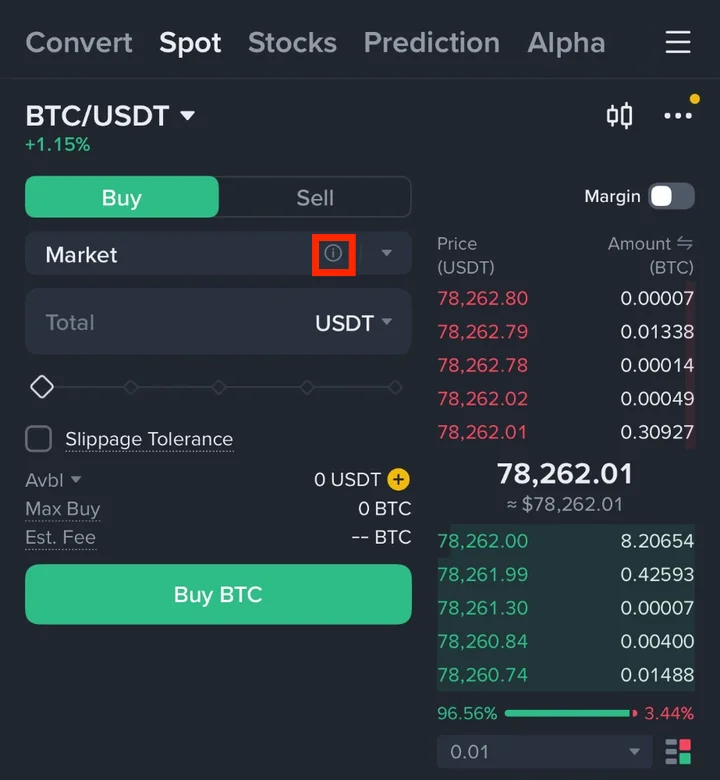
Tap the ⓘ icon in the order type box to open Binance's own help. There's a tab for each order type with a short definition. The diagrams in this guide come from those tabs.
Here's the whole list in one table:
| Order type | What it does | Who it's for |
|---|---|---|
| Limit | Buys or sells at your price or better | Everyone |
| Market | Buys or sells right away at the best price available | Everyone |
| Stop Limit | Places a limit order when the price reaches your stop price | A stop-loss or a breakout buy with a price you control |
| Stop Market | Places a market order when the price reaches your stop price | A stop-loss that should fill even in a fast move |
| Trailing Stop | Follows the price and places an order once the price turns by your percentage | Letting a profit run while protecting it |
| OCO | Places two orders; when one is triggered, the other is cancelled | A take-profit and a stop-loss together |
| TWAP | Splits an order into parts placed at regular time intervals | Large orders |
| Scaled Order | Spreads limit orders across a price range | Buying or selling in steps |
| POV | Trades a set share of the market's volume | Large orders |
Limit and Market are covered step by step in your first spot trade, so this guide starts with the stop orders.
2. Stop Limit and Stop Market orders
A stop order waits until the price reaches a level you choose (the stop price). Then it places a real order. The two versions differ only in the kind of order they place.
Stop Limit places a limit order. You set two prices: the stop price that triggers it and the limit price the order uses.
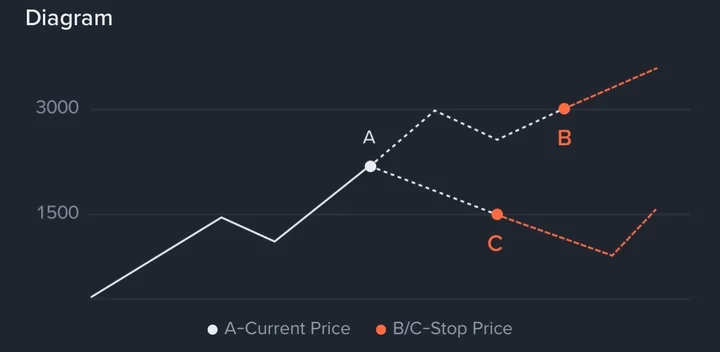
In Binance's diagram, the current price is 2,400 (A). The stop price can sit above it, such as 3,000 (B), or below it, such as 1,500 (C). When the price reaches the stop, a limit order goes in at your limit price, and your limit price can be above or below the stop price (B1, B2, C1, C2).
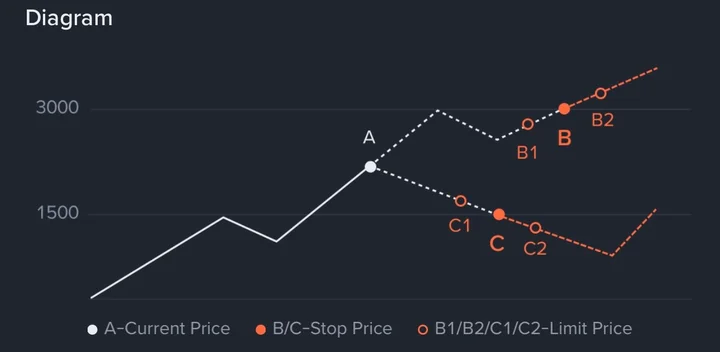
Stop Market places a market order instead. You set only the stop price. Once it's reached, the order fills at the best price available.
How people use them:
1. Stop-loss: you hold BTC and want out if it falls. Put a sell stop below the current price.
2. Breakout buy: you want to buy only if the price breaks above a level. Put a buy stop above the current price.
▣ Stop Limit may not fill, Stop Market can't control its price
When the stop price is reached, a Stop Limit only places a limit order. If the price moves past your limit too fast, the order can sit there unfilled. A Stop Market fills, but at whatever price the market offers at that moment. For a sell stop-loss with Stop Limit, setting the limit a little below the stop gives the order more room to fill.
3. OCO: take-profit and stop-loss in one order
OCO stands for One-Cancels-the-Other. It places two orders at the same time: a limit order and a stop order (Stop Limit or Stop Market). When one of them is triggered, Binance cancels the other. If you cancel one yourself, the other is cancelled too.
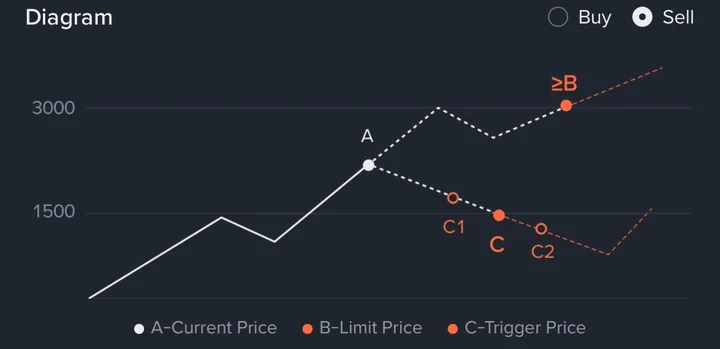
Sell OCO is the one most beginners need. Say you bought BTC and the price is now at A:
1. The limit order sells higher, at B or above. That's your take-profit.
2. The stop order triggers lower, at C. That's your stop-loss.
Whichever is triggered first goes through, and Binance cancels the other, so you don't sell twice.
Buy OCO works the other way. The limit order buys lower, at C or below, if the price dips. The stop order (trigger B) buys higher if the price breaks out instead. You get in on whichever happens first.
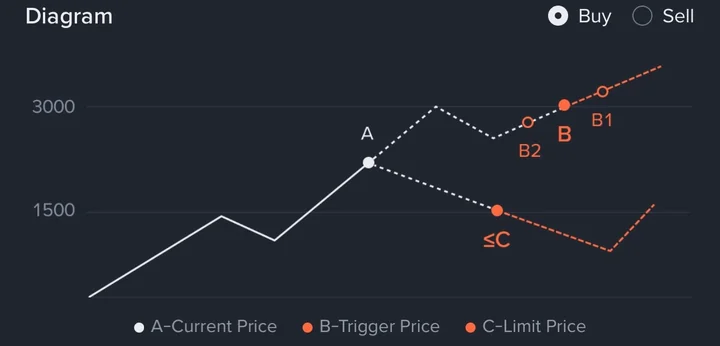
When you set up a sell OCO, the limit price has to be above the current price and the trigger price below it. For a buy OCO, it's the reverse: trigger above, limit below.
I use the same pair on my own trades. On an ICPUSDT futures position, I had a take-profit Limit / Sell at 3.975 and a stop-loss Stop Market / Sell at 2.96, right at my entry price (my two exit orders). On Spot, a sell OCO puts the same pair into one order, and Binance cancels the leftover order for you.
4. Trailing Stop orders
A normal stop stays where you put it. A Trailing Stop moves with the price, so it can protect a profit that keeps growing.
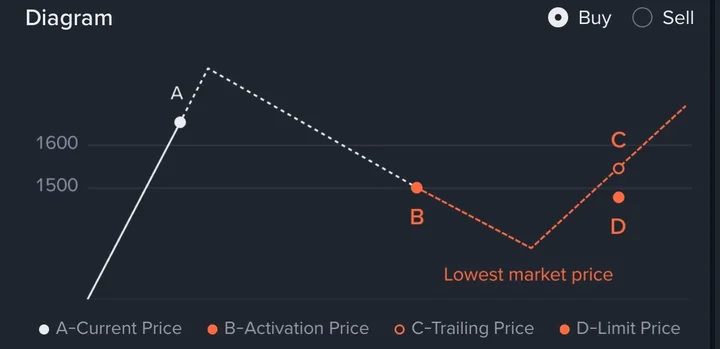
You set a percentage called the trailing delta. For a sell, the order tracks the highest price the market reaches. When the price falls from that high by your percentage, the order is placed: a limit order if you set a limit price, or a market order if you don't.
Here's my own example with round numbers. You set a sell Trailing Stop with a 5% delta. The price climbs to 3,200 and then turns down. 5% below 3,200 is 3,040, so when the price falls to 3,040, the order is placed. If the price had climbed to 3,500 first, the trigger would have moved up with it, to 3,325 (5% below 3,500).
You can also set an activation price (B in the diagram). It's optional. If you set one, the order starts trailing only after the price reaches it. For a sell, it has to be above the current price.
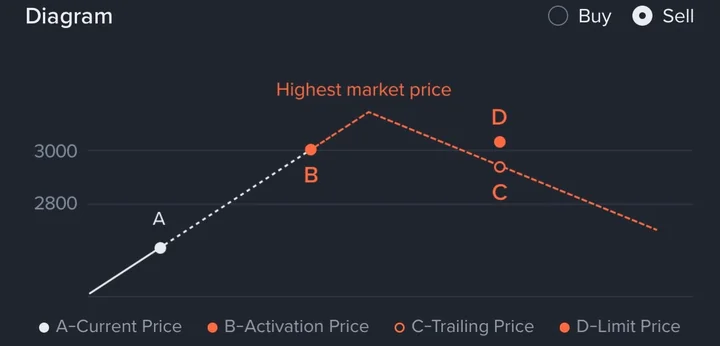
A buy Trailing Stop works the other way. It tracks the lowest price, and when the price rises from that low by your percentage, it buys. Its activation price has to be below the current price.
▣ Pick the percentage with the coin's normal swings in mind
If the delta is smaller than the coin's usual ups and downs, a normal wobble can trigger the order and sell too early. Look at how much the price usually moves before you choose.
5. TWAP, Scaled Order and POV for large orders
These three split one big order into many smaller ones. Binance's help for Scaled Order and POV says this keeps the order from moving the price much. You can skip them while your orders are small.
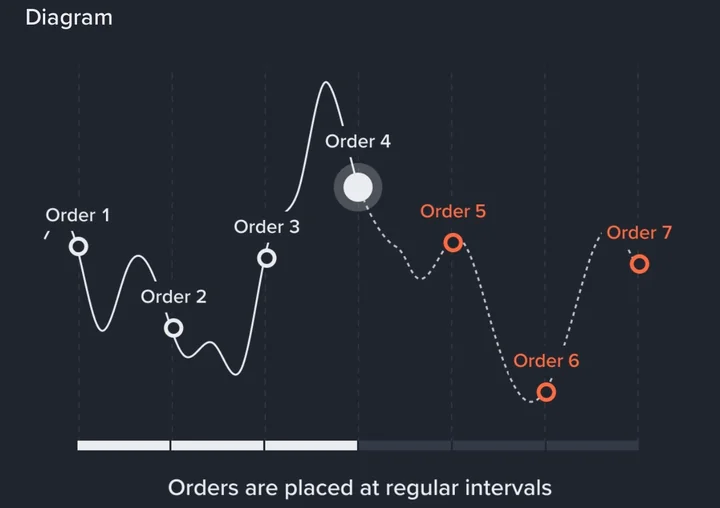
TWAP (Time-Weighted Average Price) places parts of your order at regular time intervals over a period you set. It aims to keep your average price close to the market's average over that time.
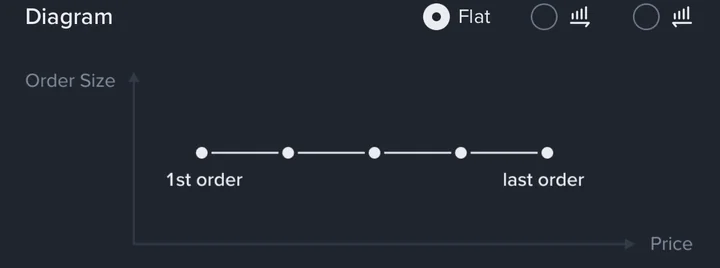
Scaled Order places several limit orders across a price range you choose. The help tab has three patterns: Flat (every order the same size), bigger orders at higher prices, or bigger orders at lower prices.
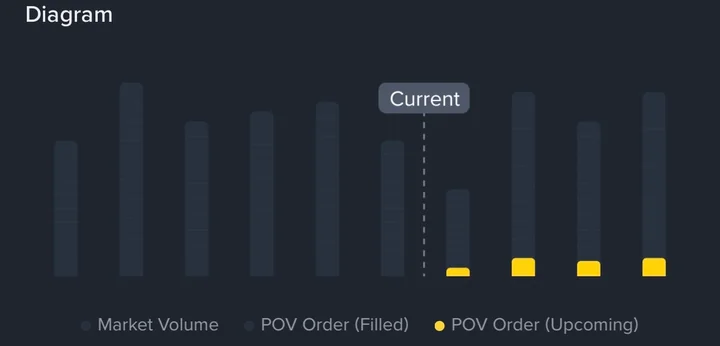
POV (Percentage of Volume) trades a set share of the market's volume. When the market is busy, it trades more; when it's quiet, it trades less.
6. Which Binance order type should you use?
| Buy or sell now | Market |
|---|---|
| Buy or sell at a set price, and wait | Limit |
| Get out if the price falls, without watching the screen | Stop Limit or Stop Market (sell) |
| Set a take-profit and a stop-loss together | OCO (sell) |
| Buy on a dip or on a breakout, whichever comes first | OCO (buy) |
| Keep a rising profit but sell if the price turns | Trailing Stop (sell) |
| Buy in steps across a price range | Scaled Order |
For most beginners, Limit and Market cover the first trades, and sell OCO is the most useful next step. On futures, I recommend Stop Limit or Stop Market instead. Whatever you choose, start with a small amount until you're sure the order does what you expect. Crypto prices are volatile, and this is a how-to guide, not investment advice.
7. Binance order types FAQ
Where do my stop and OCO orders show up?
Stop Limit and OCO orders show under Open Orders once you place them, the same place as a waiting limit order in your first spot trade.
Do I need these order types for my first trade?
No. Limit and Market are enough to buy and sell. The others help once you hold coins and want to plan your exit.
Should I use Stop Limit or Stop Market for a stop-loss?
Stop Limit lets you set the worst price you'll accept, but it may not fill in a fast drop. Stop Market fills, but the price can be worse than your stop. Choose based on which risk matters more to you.
Are these the same on Binance Futures?
The ideas are the same, but futures has its own order panel and TP/SL buttons. See your first futures trade.
That covers every order type in the Spot order list.
Well done!