From zero to your first trade in 4 steps
Follow the guides in order. Each one ends where the next one begins.
How to get 20% of your trading fees back
Add the code while you create your account. Here's how to make sure it's there.
Open the sign-up link
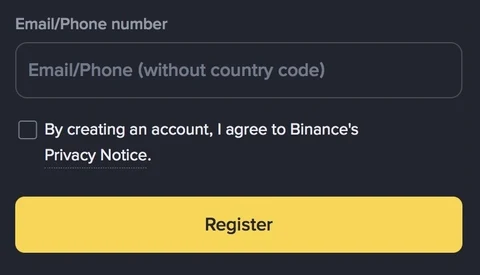
Sign up through the link below. The code MAXFEEBACK is filled in automatically — you can see it at the bottom of the sign-up page.
Or signing up in the app?
Type MAXFEEBACK when the app asks for a referral code. Don't skip that screen.
Check before you finish
Before you tap the last button, make sure the code shows at the bottom of the sign-up page, or that you typed it in the app.
Questions before you sign up
Is there any downside to using a referral code?
No. You pay nothing extra, and you get a 20% commission rebate on your trading fees.
Can I add the code to an account I already have?
Usually not. Binance only allows linking a referral code after sign-up in limited cases, so add it while you create your account.
How do I know the code has been applied?
When you open the sign-up link, the sign-up page shows the code at the bottom. In the app, check that you entered it on the referral screen before you finish.
All Binance guides
Short explanations, real screens. Pick what you need — new guides are added one at a time.
Start with the sign-up guide →- 01Read →
- 02Read →
- 03Read →
- 04Read →
- 05Read →
- 06Read →
- 07Read →

Built by one trader with 10 years in crypto. Free to use.
Build your own trading rules from blocks — no coding needed. Test them on past charts and live prices first. When you're ready, Stepcore runs them on your own PC, 24/7 while it's on, and sends you alerts on Telegram.
- Free · open source at launch
- Runs on your own PC
- No withdrawal permission needed
- 01
Free. No subscription, no payment.
No monthly fee and nothing to pay. Backtests, paper trading, alerts and Binance Demo Mode are free for everyone; real-money trading needs a free activation.
- 02
Security first: your keys are kept on your PC.
Unlike cloud bots that keep API keys on their servers, Stepcore creates the secret key on your PC by default and encrypts it with OS security. No key server to hack; no withdrawal permission needed.
- 03
Open source. Make it yours.
The full source code goes public at launch under the MIT licence. Anyone can modify it — fill in the indicator template, hand it to an AI coding tool, and add your own indicators to your copy.
- 04
No code. Your rules, exactly.
Snap together indicator, price and volume conditions, other timeframes and a BTC trend filter — or ask the AI chatbot you already use to write a strategy, then import it.
- 05
Stop-loss on Binance, the moment you enter.
Spot: right after a market buy, a take-profit + stop-loss OCO order goes on Binance. USDⓈ-M futures: stop-loss and take-profit orders go on as soon as the entry fills. They stay on Binance even if your PC turns off.
- 06
Same numbers as the Binance chart.
Of the 46 indicators, 22 are checked against Binance's own chart values; the other 24 follow TradingView's default calculations.
- 07
Test first. Then go live.
Backtest with fees and slippage, replay past charts candle by candle, paper-trade at live prices and try Binance Demo Mode — all before real money.
Not available to download yet. Stepcore runs the rules you set and does not guarantee profit. You can lose money trading crypto. Example strategies only show how rules are put together; they are not recommendations. If your PC is off, only the take-profit / stop-loss orders already on Binance remain. Try your rules in Binance Demo Mode first.
Crypto, explained simply
Market issues, indicators such as CVD and the Fear & Greed Index, and the tax and rules you need to know.
- 01Read →
- 02Read →
- 03Read →
Written by a trader with 10 years in crypto
I've traded crypto for 10 years. These guides show exactly what I see on my own screen — so you can follow along without guessing.
- 10 yearsof trading crypto
- Real screenshotstaken from my own account, step by step
- How-to onlythese are guides, not investment advice
New to Binance? Start with step 1.
Sign up and verify your account — one screenshot at a time.